

Arguably the most useful application on the Mac, the mobile version of 1Password can now be found on the AppStore.
Gotta be honest here… if I didn’t already have an iPhone, it’s applications like this that’ll make me want to get one asap – it’s just so fucking useful.
For the uninitiated, 1Password, in it’s most basic form is a password storage application. Much like Firefox’s password manager, or the Apple Keychain built right into OSX.
The reason why it so much better though, the reason why I myself have purchased the application despite my ability to easily source a pirated license, is how well thought out the whole application is. It’s one of those things that just clicks with you once you start using it… and you suddenly find out that you can’t live without it.1: http://support.agilewebsolutions.com/showthread.php?t=9856 “view post”
The Desktop App
Here’s the promo video:
As you can see, on the password management front alone, 1Password already proves itself to be invaluable. But what’s even better is that you can store different information as well, bank accounts, secure notes, etc. etc. So you now have a single secure point of accessing sensitive information – very useful for people who forget things easily.
The Mobile App
1Password used to put a Safari bookmarklet in the iPhone so you can fill up login information via JavaScript. At the time it was a stopgap, a hack if you will – but a very useful one at that. You could automatically fill up forms or login fields even on the iPhone… and we all know the iPhone doesn’t have cut and paste… so that right there makes for another invaluable tool as demonstrated by the animated image below (click on it for a bigger version).
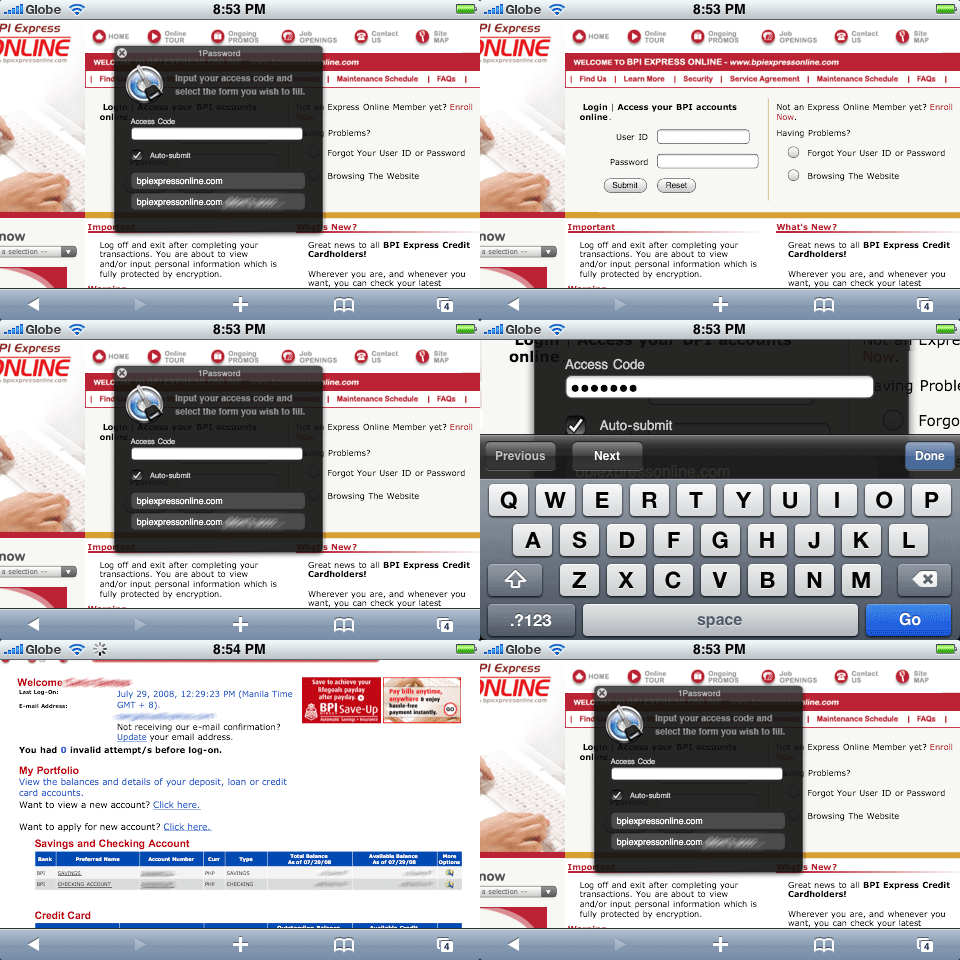
Now it’s an official iPhone application. The only application close to it is Illium Software’s eWallet (which I used to use in my XDA days), however the latter isn’t as elegant and browser compatible as 1Password – eWallet doesn’t have the kind browser interactivity 1Password offers… and we all know how crucial browsers have become to the wired generation.
The Downside
The only downside I can see is with regards to the aforementioned removal of the bookmarklets in the advent of the native app. They have explained why this was removed, but personally – I think instead of removing it, they should find a way to tune it to allow users to still use it while being secure. I’m not sure if this is even feasible given the limitations of the OS architecture and SDK, but I won’t lose hope.
Here’s what I wrote in their support forums:
I think us users wanting the bookmarklet back are on a losing battle, but here’s my last 2 cents on the matter:
The reason why I think they should be put back is simple. Removing it and stating that native app would do the browsing is similar to implementing a browsing client in the desktop app and urge users to use that instead. We all know that’s just bollocks.
Apps that have built-in browsers (e.g. NetNewsWire) still give you the option to use your standard browser – but what makes 1Password different is the fact that you need to interact more with the said browser. But I think simply requiring the use of the built-in browser is a weak argument in 1Passwords case: remember, the very thing that set this application apart from other password managers is precisely the ability to integrate and automate form-filling in any browser (talking about the desktop app here) – the approach of the native (iPhone) app is not true with that vision that made the desktop app so great in the first place.
The only time it would be compelling to use the native app for browsing, is if by some miracle you could make the “browser” perform as good as, if not better, than Mobile Safari… in that case we could just use 1Password as an alternate browser for the iPhone like the Firefoxes of the world – but given he situation of iPhone development scene, I seriously doubt this will ever be the case.
Plus I wouldn’t want you guys to spend development time in BROWSER programming when it would be better to focus on what makes 1Password awesome: INTEGRATION.
If it’s truly a dead-end, then why not just include it with a disclaimer or fine print… or have an option to enable it buried deep in the preferences (and have it disabled by default). Give the users the option to take the risks themselves hehehehe. I personally am responsible in my browsing so the loss of the bookmarks is more bad than good for me – as I’m losing much needed functionality over “safety/security” which I already have regardless of the exploit.
Current Workaround
In the forums, they suggested that people rollback to 2.7.x if they really can’t live without the bookmarklets. They’re announcing 2.8.1 as the official upgrade to 2.7.x Unfortunately this would mean no WiFi sync for the iPhone/iPod touch.
But you can actually get both WiFi sync and bookmarklets – the magic number is 2.8.0 there’s a beta 2.8.0 available here:
http://s3.amazonaws.com/agile/dmg/1Password-2.8.0.dmg
I just hope the link stays alive.