Little color change

Literally, I changed the color scheme of the site a little. So little, you might even be wondering what the hell I changed.

I dropped the traces of blue (headers, etc.) in favor of green just so it would gel with the rest of site. No, this has nothing to do with the school I’m partial to (come to think of it, i wonder if it was a subliminal action that I started with blue and green as the color combination – which doesn’t make sense design-wise)

Anyways, I had to drop one or the other, and I already had too many green hues in my stylesheet (gradients, the calendar, the alternating table colors), so it made more sense to change the little blues here and there, rather than convert a ton of greens.

I kept the old images though, I could put it back if people say the old style looked better.

Another Lightbox hack

NOTICE
CONTENTS NO LONGER APPLICABLE

The content discussed in this post is no longer valid; as I’m now using a different “lightbox” implementation.
More here

When opening an image via lightbox, closing an image can get very counter intuitive. The close button is at the bottom right, which sucks if you have an image that’s larger than the viewing area. Trying to move that close button on the upper right can be too tedious as it requires a lot of modification on the DOM script and CSS. The easier thing would be to simply allow users to close the image when they click on it, after all, what else does one person usually do after viewing an image but close it right?

A hack for this is easy to do, however this usually broke Lightbox‘s “group” mode – instead of moving to the previous/next image, it prioritizes the close function assigned to the image container instead of the group mode’s prev/next overlays – resulting in the image closing anywhere you click.

The trick was to find another place where I could inject similar code, while making sure that it only does it when it’s viewing a single image. Read More

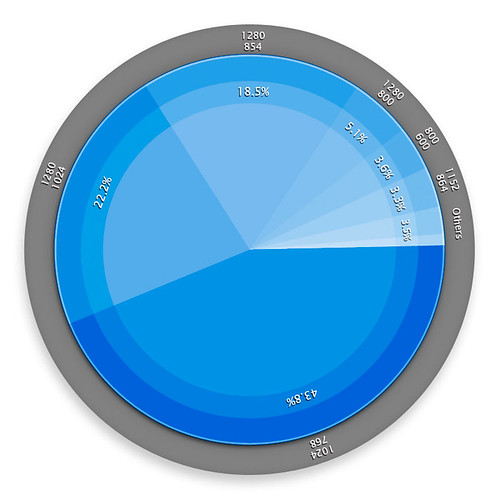
Eye-candy statistics

I was a bit bored a while ago, so I thought I’d just try to duplicate how this certain guy made his really cool pie-charts. There were so many comments asking how he did it even if they looked pretty simple to do (aside from having to actually conceptualize them of course). I even ended up making a template for it – for when I’ll use it (of which I have no friggin’ idea hahaha). In any case, just like the original guy did, I took information of visitors’ browser resolutions 1 I guess for the image to have some value however small – to prove that my decision to abandon 800×600 was the correct choice. from Mint’s Agent 007 pepper 2 A Mint plugin is called a “Pepper.”. I just did one chart though, since it was time consuming.

Notes

Notes
1 I guess for the image to have some value however small – to prove that my decision to abandon 800×600 was the correct choice.
2 A Mint plugin is called a “Pepper.”

Constantly evolving

Between the time between I last posted about any added “feature” on the site, and this post; rhere have been a whole bunch of modifications on the backend which may not be noticeable to end users, but have been constantly making things easier for them (and myself) to play or browse around the site and its sections.

Read More